
What if payroll automation gave your team more control, not less? When payroll depends on repeated spreadsheet entry, keeping employee changes, attendance, leave, and pay inputs aligned takes time. It can also be difficult to spot a statutory deduction issue before processing. Learning how to automate payroll in Kenya starts with a controlled workflow, not simply replacing a spreadsheet with software.
A reliable process connects workforce records to payroll calculations and gives your team a clear review point before salaries are processed. Automation can reduce repeated handoffs, but your team still needs to check payroll outputs and statutory deductions. Build that review into the workflow so it happens every cycle.
This guide covers practical steps to organise employee records, align attendance and leave data, configure payroll inputs, and review calculations before approval. It also explains how Zuri HR connects payroll management with time and attendance, leave management, and employee self-service to help Kenyan businesses build a consistent, reviewable payroll process.
Key Takeaways
- Learn how to automate payroll in Kenya by connecting employee records, pay inputs, calculations, approvals, and payslip distribution in one repeatable workflow.
- Prepare payroll data by assigning ownership and organising employee details, salary components, approved changes, attendance, and leave.
- Build a consistent monthly run that closes inputs, reviews changes, calculates pay, resolves exceptions, and secures approval before payslips go out.
- Keep human oversight in the process with checks for missing information, unusual changes, unexpected totals, and unresolved exceptions.
- See how connected payroll, leave, attendance, shift planning, and employee self-service can reduce repeated data handoffs.
Why automate payroll in Kenya? Start with the workflow, not the software
Payroll automation is more than moving a spreadsheet into an application. It connects employee records and approved pay inputs to calculations, review, approval, and payslip distribution, with a defined process for each stage. To understand how to automate payroll in Kenya, first map how information moves through your current monthly cycle. Note who provides each input, who checks it, and who approves the run.
Problems often arise at handoffs. A salary change may be recorded in one file but missed in the payroll sheet. Attendance or leave information might arrive after calculations begin. A late adjustment can then be difficult to trace, especially when different team members update separate records. Connecting these inputs creates a clearer route from an approved change to its effect on payroll.
Payroll automation in a Kenyan business connects workforce records and approved pay inputs to payroll calculations, accountable review, approval, and payslip distribution in a consistent workflow. It can support more consistent processing, but it does not make compliance automatic or remove the need for people to review the result.
Which payroll tasks can a Kenyan business automate?
A payroll system can support recurring salary processing, statutory tax calculations, and payslip distribution. It can also bring approved employee changes and payroll inputs into the cycle, rather than requiring someone to re-enter the same information in disconnected files. For example, a recorded and approved pay change can be included as an input for the relevant run.
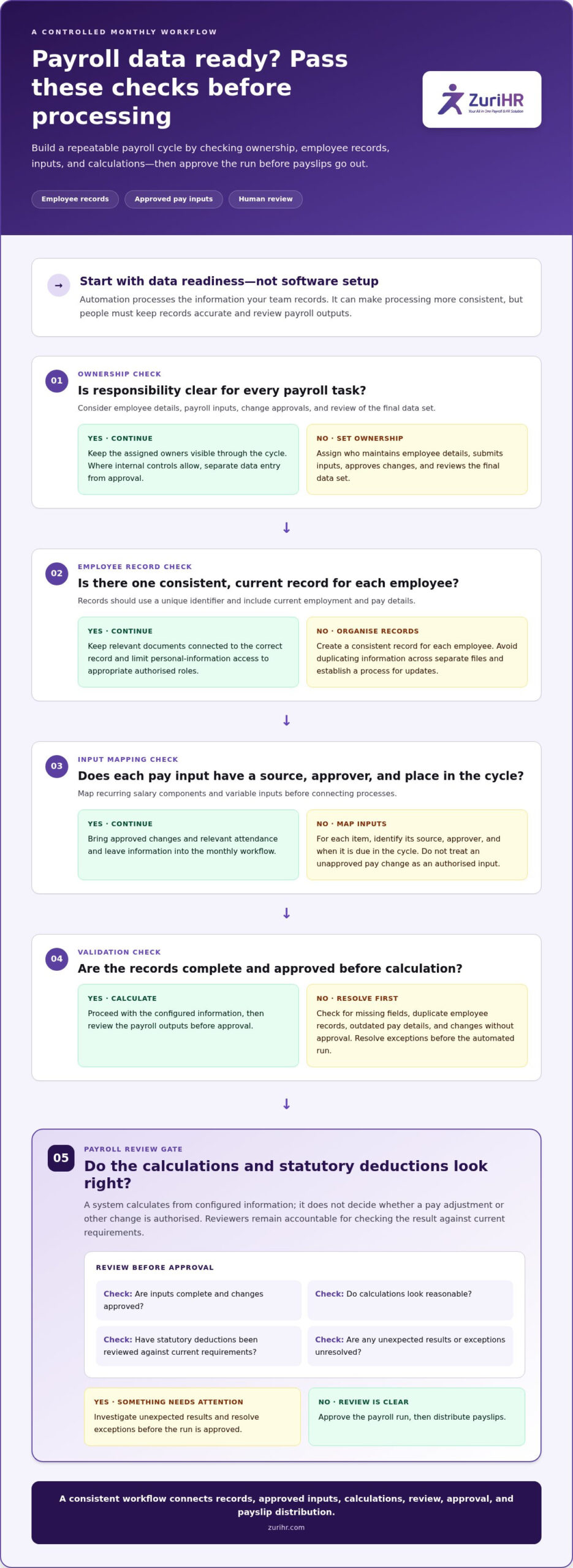
Automation handles repeatable tasks, while authorised people retain decision-making responsibility. Reviewers should confirm that changes are approved, inputs are complete, calculations look reasonable, and the final payroll is ready for processing. A system can calculate from configured information, but it should not decide whether a pay adjustment, bonus, or other change is authorised.
What payroll automation does not mean
Software cannot compensate for inaccurate employee records or unclear payroll policies. If a team has no consistent way to document and approve pay changes, digitising the process can reproduce the same ambiguity faster. Define ownership and approval steps first, then use the system to apply them consistently.
Automated calculation and employer review are separate controls. A reviewer still needs to examine payroll outputs and relevant statutory deductions against current requirements before approval. Kenyan rules can change, so keep payroll configuration and review processes aligned with authoritative, up-to-date guidance. Automation can make checks more structured and adjustments easier to trace, but it cannot eliminate every error, compliance risk, or manual task.
Use this control sequence to keep the workflow accountable:
- Record payroll inputs and employee changes in an organised source.
- Confirm that the right person has approved each change.
- Review calculated outputs and investigate unexpected results.
- Approve the run before distributing payslips.
This workflow-first approach gives payroll teams fewer repeated handoffs, clearer responsibility, and a defined point to catch issues before processing.
Prepare Kenyan payroll data before automating the monthly cycle
Start with data readiness, not system configuration. Automation can only use the information your team records, so decide where each payroll input comes from and who owns it before connecting processes. A reliable, current source record is the foundation of dependable payroll automation. The system can process information consistently, but people must keep that information accurate.
Use this sequence to prepare the monthly cycle:
- Define ownership. Assign responsibility for maintaining employee details, submitting payroll inputs, approving changes, and reviewing the final data set. Where your internal controls allow, separate data entry from approval.
- Organise employee records. Create one consistent record for each employee, using a unique identifier and current employment and pay details. Keep relevant documents connected to the right record instead of duplicating information across files.
- Map pay inputs. List recurring salary components and variable inputs, such as approved changes, attendance information, and leave records. Identify the source and approver for each item, along with the point in the cycle when it is due.
- Validate the data. Check for missing fields, duplicate employee records, outdated pay details, and changes without approval. Resolve exceptions before the first automated run rather than carrying uncertainty into the calculations.
Build one reliable employee and pay record
Keep employee identifiers, current pay details, salary components, and relevant employment records together in a controlled record. Define how authorised staff submit changes and who approves them. For example, a proposed pay adjustment should not become a payroll input until the designated approver has accepted it. Limit access to personal information to appropriate authorised roles, and establish a clear process for updating records when details change.
Connect attendance and leave inputs carefully
Attendance and leave records can inform payroll only when the team has agreed how to review and use them. Set a monthly cut-off for submissions and approvals, then assign someone to resolve missing entries or conflicts, such as an attendance record that differs from an approved leave request. Keep unresolved items visible for review instead of treating incomplete data as final. A structured payroll and attendance workflow can help teams connect these records and reduce repeated handoffs.
Document the cut-off, the responsible reviewer, and the process for correcting an input. This gives managers a consistent way to handle late submissions while tracking what changed and whether it was approved. For practical guidance on statutory tax information used in payroll, consult the Kenya Revenue Authority (KRA) and keep configured payroll inputs aligned with current authoritative guidance.
Before importing or connecting records, run a final readiness check: confirm each employee has one usable record, pay components have clear definitions, changes have an approval path, and attendance and leave inputs have named owners. This preparation turns how to automate payroll in Kenya into a controlled implementation task, not a rushed migration of inconsistent spreadsheets.
Automate a Kenyan payroll run from input review to payslips
Turn prepared records into a repeatable monthly cycle. Give each stage a clear owner and handoff, so payroll moves from a defined input cut-off to approved calculations and payslips. The sequence matters: calculating before reviewing late changes can create avoidable rework and leave the team unsure which figures reflect the final inputs.
- Close payroll inputs. Apply the agreed cut-off and gather pay, attendance, leave, and approved employee-change information for the period.
- Review changes. Confirm that changes have the required approval and belong in this run. Route late or incomplete items for a decision instead of treating them as settled.
- Calculate payroll. Use the configured system to process salary and applicable statutory deductions from the approved data.
- Resolve exceptions. Address incomplete inputs or calculation items that need clarification before the run moves forward.
- Approve the output. Have the assigned reviewer examine the payroll results and authorise processing.
- Distribute payslips. After approval, issue payslips through the established employee access process.
Keep the cycle visible to everyone responsible for a handoff. Clear statuses, such as awaiting input, ready for review, or approved, help the team distinguish work in progress from a completed stage. Set the cut-off and review schedule to fit your business cycle, and don’t treat a draft calculation as approved payroll.
Calculate salary and statutory deductions with review
Payroll software can process salary and configured statutory calculations using approved inputs. For a Kenyan payroll run, this can include PAYE, NSSF, and SHIF, with applicable rules checked against current authoritative guidance before configuration and use. Reviewers should know which period and employee data feed each calculation. The software supports the calculation; the employer’s review confirms that the inputs and outputs are ready for approval.
Keep employment-related pay settings aligned with current official guidance, including information from the Ministry of Labour and Social Protection. Don’t rely on an old setup simply because it produced results in a previous month. When rules or employee circumstances change, make the update through the organisation’s controlled review process before the next run.
Approve payroll and distribute payslips
Assign a reviewer to examine the completed payroll output before approval. Once authorised, distribute payslips through the chosen employee access channel. Employee self-service can give staff a place to view their payslips. Keep distribution after approval so employees receive the final output, not a draft. Consistent organisation also makes payroll payslips easier for employees and payroll teams to retrieve.
This sequence makes how to automate payroll in Kenya a practical operating routine: close, review, calculate, resolve, approve, and distribute. Repeat the same stages each cycle, updating inputs and configured rules through accountable review.
Keep control: review automated payroll and Kenyan statutory records
Automation doesn’t remove human oversight. It gives your team a structured way to apply it. Reviewers can work from the same defined payroll outputs each cycle, trace changes to their source, and hold approval until unresolved items receive attention. This keeps accountability with authorised people and reduces reliance on informal checks across separate files.
Assign clear roles for preparing inputs, reviewing calculations, approving payroll, and maintaining records. Where practical, separate preparation from approval so one person doesn’t make and authorise the same change without a second review. Keep a traceable record of adjustments, who approved them, and which payroll output they affected. Limit access to employee and payroll information to appropriate roles.
Create a practical payroll review checklist
Apply the same review sequence before each approval. Compare pay changes with authorised employee records, confirm attendance and leave inputs, and check that required information is present. Investigate unexpected totals or unusual changes, such as a material difference from the prior run, before approving payroll. Keep unresolved exceptions visible and record how the reviewer resolved each one.
- Confirm that employee and pay changes have an approval record.
- Check that attendance, leave, and other approved inputs are included for the correct period.
- Identify missing information, duplicate entries, and unexpected payroll totals.
- Resolve or formally hold exceptions before the authorised approver signs off.
Maintain clear Kenyan payroll and deduction records
Organise payroll outputs, payslips, approvals, and relevant deduction records so the team can connect each completed run to its supporting information. Reconcile payroll totals with payment records using your organisation’s established controls, and document any differences and their resolution. For PAYE review, keep the deduction calculation and supporting payroll inputs traceable together rather than relying on a total without context.
Statutory requirements can change, so don’t treat a saved configuration or last month’s calculation as proof that current rules still apply. Review relevant Kenyan requirements against authoritative guidance, then update payroll settings through an authorised process. This keeps software calculations grounded in current rules while preserving a human checkpoint before approval. A focused review of PAYE deductions in Kenya can help payroll teams identify what to examine within that broader control process.
Keep the review practical: verify the inputs, follow up on exceptions, document decisions, and approve only when the required checks are complete. To bring payroll calculations and review into a connected workflow, explore payroll management software.
Scale payroll automation with Zuri HR’s connected Kenyan HR workflows
Once your payroll cycle has clear inputs, review points, and approval ownership, connect it to the workforce processes that generate those inputs. Zuri HR is a Kenya-built cloud HR and payroll platform that brings payroll management together with leave, time and attendance, and employee self-service.
That connection matters in day-to-day administration. A leave request, attendance record, or shift plan can affect the information payroll teams need to review. Managing these activities within connected HR workflows can reduce repeated handoffs and make it easier to trace where an input came from. Staff and managers still follow the organisation’s approval process; connected software supports the workflow without replacing those decisions.
Bring workforce inputs into the payroll workflow
Zuri HR combines payroll management with leave management and time and attendance, including smart attendance tracking and shift planning. These functions help organise workforce information payroll teams may need to consider during a run. For example, the team can review attendance and approved leave alongside payroll inputs, then apply its established checks before processing. This creates a more coherent workflow without assuming that every record updates payroll automatically.
As your organisation grows, a shared operating structure can make responsibilities clearer: managers maintain or approve relevant workforce records, while payroll staff use appropriate inputs during the payroll cycle. Set clear cut-offs and review responsibilities so teams know which attendance and leave information is ready for payroll consideration. The software supports the process; your team remains accountable for validating inputs and approving outputs.
Give employees clearer access through self-service
The Employee Self-Service mobile app lets staff view payslips, request leave, and update personal profiles. This gives employees a direct channel for recurring tasks that might otherwise require separate requests to HR. For example, an employee can access a payslip through self-service, while a leave request enters the organisation’s leave workflow for review. HR teams can focus on managing records and decisions rather than repeatedly relaying routine information.
Centralised access also supports a more consistent employee experience. Staff have a defined place to view payslips and submit leave requests, while HR and payroll teams manage related records through their established processes. As you consider how to automate payroll in Kenya, assess how employee, attendance, leave, and payroll workflows can work together without weakening review or approval controls.
Start with the workflow you want to improve, such as reducing repeated payslip requests or organising attendance inputs for payroll review. Map the people, records, and approval steps involved. Explore Zuri HR payroll and HR workflows to see how connected payroll, leave, attendance, and employee self-service can support a more structured process.
Make your next payroll cycle the starting point
Choose one recurring handoff that slows your payroll team, then define what a better process should look like: clear ownership, reliable inputs, and a review point before approval. Starting with one handoff gives your business a practical way to assess progress without redesigning every HR process at once.
As you plan how to automate payroll in Kenya, consider how payroll management software in Kenya can work alongside leave, time and attendance, and employee self-service. Zuri HR is a Kenya-built cloud HR and payroll platform designed to support these connected workforce workflows, helping your team manage routine administration through a more coordinated process.
Map one payroll handoff, identify the people and records involved, and decide where a connected workflow could bring greater clarity. Explore Zuri HR payroll and HR workflows to take the next step toward a more structured payroll process.
Frequently Asked Questions
How do I automate payroll in Kenya?
To automate payroll in Kenya, first define who maintains employee and pay information, who supplies variable inputs, and who approves the completed run. Then configure payroll software around your documented pay components and review process. Test the setup against a prior payroll period by comparing results with the records your team used at the time. Resolve differences before relying on the new workflow for a live run, and assign an owner for future configuration changes.
Can payroll software calculate PAYE, NSSF, and SHIF in Kenya?
Yes. Payroll software can calculate PAYE, NSSF, and SHIF using configured employee data and applicable rules. Zuri HR’s payroll capabilities include automated statutory tax calculations, but the result still depends on accurate inputs and current configuration. Have an authorised reviewer check the rules and resulting deductions against current authoritative guidance before approving payroll, especially after a regulatory update or a change to an employee’s pay circumstances.
What information do I need to automate payroll?
Prepare a current employee record for each worker, with a consistent identifier, employment details, and agreed salary components. Also gather approved changes, relevant attendance and leave information, and any payroll inputs your organisation uses for the period. For example, a salary adjustment needs both its updated value and evidence of approval. Decide who can access or change each record, and resolve duplicate profiles before importing data into the payroll workflow.
Does payroll automation eliminate payroll errors?
No. Automation can reduce re-entry and apply configured calculations consistently, but it can’t correct an inaccurate source record or an unapproved change by itself. If an employee’s pay details are outdated, the system may use those details consistently and still produce an incorrect result. Review exceptions, compare unusual outputs with their source records, and document corrections so the same data issue doesn’t carry into later payroll cycles.
How can attendance and leave records feed into payroll?
Use attendance and leave records as reviewed payroll inputs, not as unexamined figures. For example, a manager can confirm a timesheet entry or approve a leave request before the payroll team includes relevant information in the period’s calculation. Set a clear cut-off and a process for investigating missing or conflicting records. Time and attendance tools can help organise work-hour and shift information, while payroll staff remain responsible for reviewing applicable inputs.
How often should a business review payroll calculations and statutory deductions?
Review calculations and deductions during every payroll cycle, before the authorised approver releases the run. Also revisit payroll configuration when employee pay circumstances change or authoritative guidance indicates that a statutory rule has changed. Record when the team reviewed the setup and what it updated. This creates a practical control point instead of assuming that a previous period’s correct result confirms the current configuration.
Can a small business automate payroll without removing human approval?
Yes. A small business can automate repeatable calculations and payslip preparation while keeping a person responsible for checking and approving each payroll run. Assign distinct preparation and approval roles where staffing allows. If one person handles both, document the review and approval steps clearly. For example, the payroll preparer can flag an unusual pay change, then the owner or designated approver can verify its authorisation before the business processes payroll.